
Ask anyone who gave up on web development where they stopped, and it is rarely a loop or an array. It is the setup. An installer that wants administrator rights. A green icon that stays red. Port 80 is already in use, because Windows handed it to IIS years ago. A php.ini you are told to edit before you have written a line of PHP. People do not quit because programming is hard; they quit because nothing has happened yet.
This guide is the other path, in two halves. First a local stack that runs from a folder and solves the port problem by not having one. Then what to build on it — a real database application, its REST API, and an installable phone app, from a single project.
Key takeaways
- PPServer is a free, portable PHP stack — PHP 8.5, MariaDB 11.8 LTS, Caddy, SQLite, phpMyAdmin and a SQLite browser — in one folder, on Windows, macOS and Linux. No installer, no administrator password, nothing registered as a service.
- Nothing to uninstall. Delete the folder and the machine is exactly as it was. That is also what makes it safe to try.
- The port problem solves itself. If IIS, Skype or an existing MySQL already hold 80 and 3306, PPServer steps aside to 8080 and 3307, writes the choice down, and the address never changes again.
- PPPHP RAD Studio turns a database on that stack into a working application — lists, forms, dashboards, roles, a REST API and an installable mobile app — and generates plain PHP you own and can host anywhere.
Why the first hour is the hardest one
The classic bundles were a real gift in their day, and millions of developers started on them. But the shape of the problem has aged badly, and most of the pain is the same four things:
httpd.conf, find Listen 80, change it, restart — is a config file before a first page.None of those are hard problems. They are just the wrong problems to meet before you have seen your own page load.
PPServer: the whole stack in one folder
PPServer is free and takes the opposite approach. You download an archive for your platform, unzip it wherever you like — Desktop, a USB stick, a synced folder — and double-click Start PPServer. The icon with the green tick starts it; the one with the red cross stops it. Nothing is installed, no password is asked for, and no service is registered.
intl is on" is a sentence you can skip.mod_rewrite to discover and enable.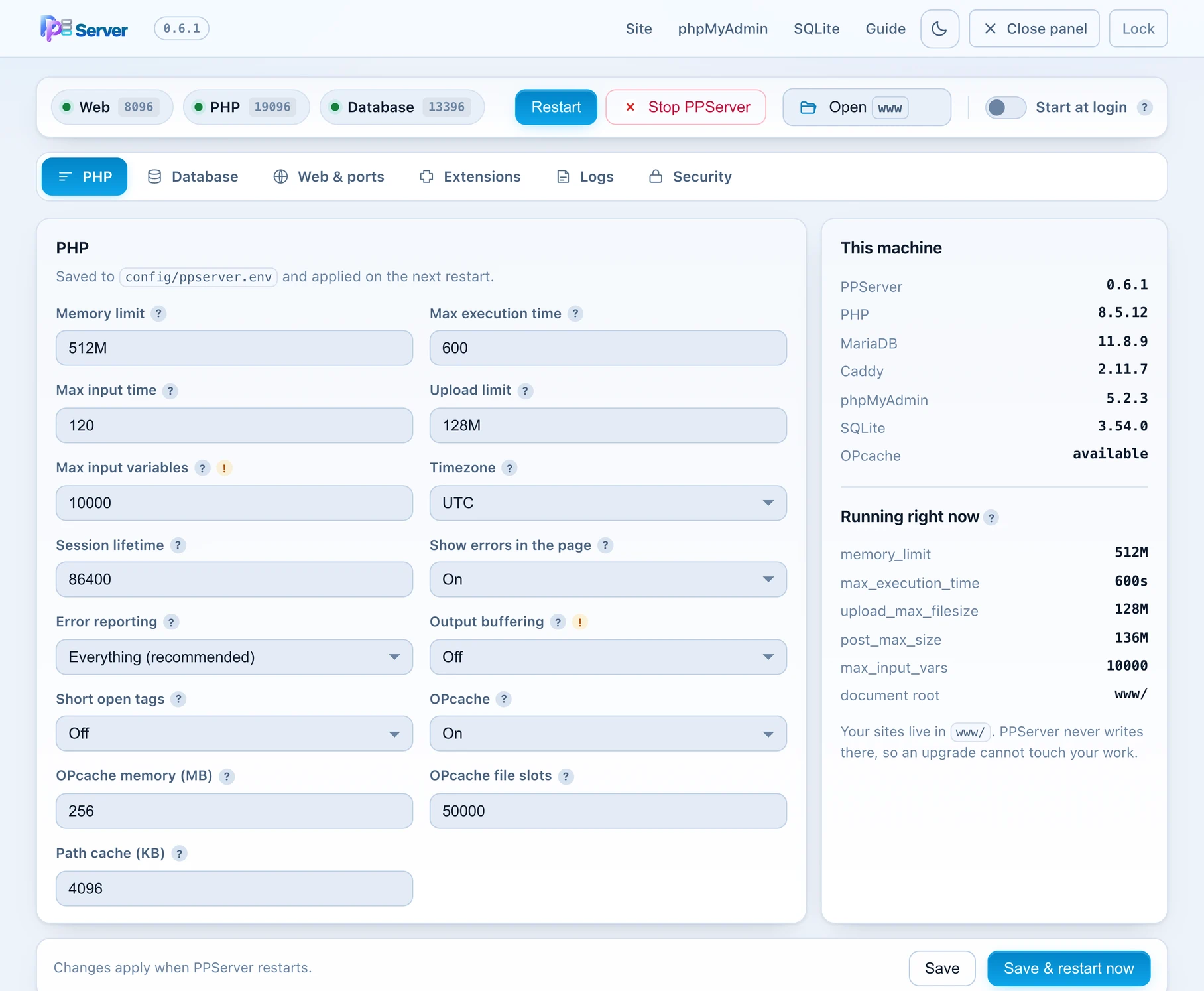
php.ini, as a form. The right-hand column lists the exact version of every component it is running, and the panel shows which ports it took — here the web server stepped aside because something else already held 80 and 3306.The port problem, handled
This is the detail that saves the most time, so it is worth stating plainly. On first run PPServer takes the standard ports if the machine will give them up — on Windows that is usually http://localhost/ with no port at all. If something already holds them, it steps aside to 8080 and 3307, records that in its own config, and prints the address it actually took. The address then never changes. There is no httpd.conf, no Services panel, and no moment where the tray icon is red and the internet disagrees about why.
A control panel instead of config files
Everything a beginner is usually told to edit by hand has a switch: PHP limits and error reporting, OPcache, the database port and buffer pool, extensions, logs, and which PHP version a site uses. Start and stop, start at login, and the one rule worth learning — your sites live in www. Upgrading is a backup and a restore: tick what matters on the Backup tab, unpack the new release into a new folder, and restore the file it gives you.
Everyone runs the same PHP, the same MariaDB and the same web server, because it is literally the same folder. “Works on my machine” stops being a category of bug — without anyone having to learn Docker first.
It also looks after the thing a local server quietly becomes responsible for: the only copy of your work. The Backup tab lists your databases and the folders inside www as tick-boxes — choose what matters, press one button, and you get a single compressed file you can carry to another computer or to a newer PPServer. It can run on its own every day or every week, using your computer's own scheduler for your account only; and if the database is not running at that moment, the run is skipped and says why rather than writing a backup with your files and none of your data. Restoring lists what is inside the file, marks what it would replace, and takes a safety copy of that first. If the backup is leaving your hands, you can put a passphrase on it.
You have a stack. Now what?
This is where most setup guides stop and the real question starts. A local server is not the goal; the goal is the application. And for the kind of software most people actually need to write — an admin panel, an internal tool, a portal, a booking system, a back office — the work is unglamorous and enormous: the same list, form, search, filter, export, permission and audit code, table after table.
PPPHP RAD Studio installs onto PPServer in a couple of minutes and does that part. You point it at a database — or design the tables in it — and it generates the application: list pages with search, filters, sorting and inline editing; add, edit and view forms with validation; dashboards with real charts; users, roles and permissions. What comes out is plain PHP and SQL in a folder you own, which you can read, edit and host anywhere PHP runs. There is no runtime, no per-seat licence on the thing you built, and nothing phoning home.
What is in it now
The studio has grown well past "CRUD generator". The pieces below are the ones that most often replace a separate service or a second project.
| Area | What you get |
|---|---|
| The page designer | A drag-and-drop canvas with 149 component types — tables, cards, KPI tiles, charts, gauges, funnels, calendars, Kanban boards, forms, menus — plus 62 field controls and 22 validation rules you configure rather than code. |
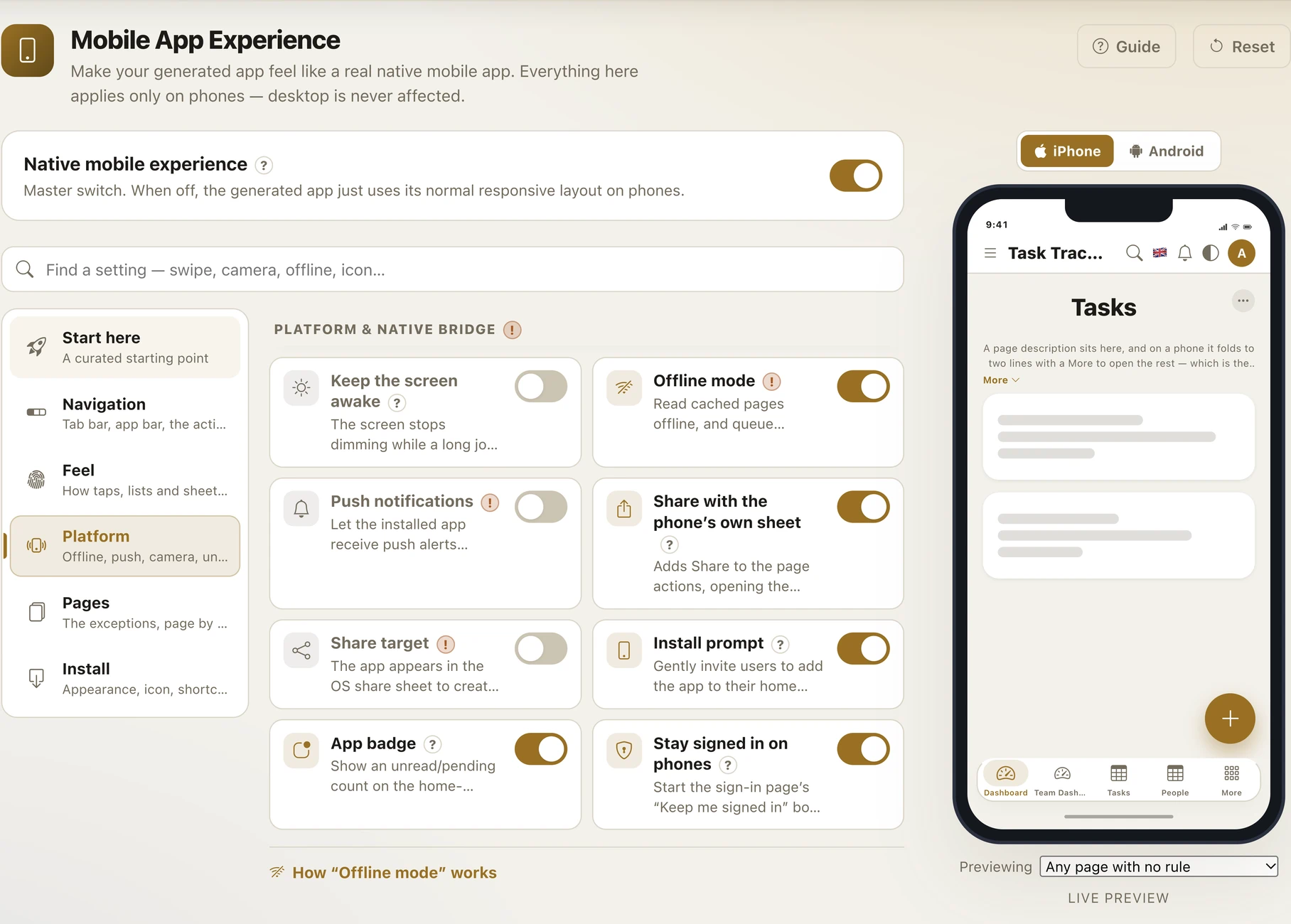
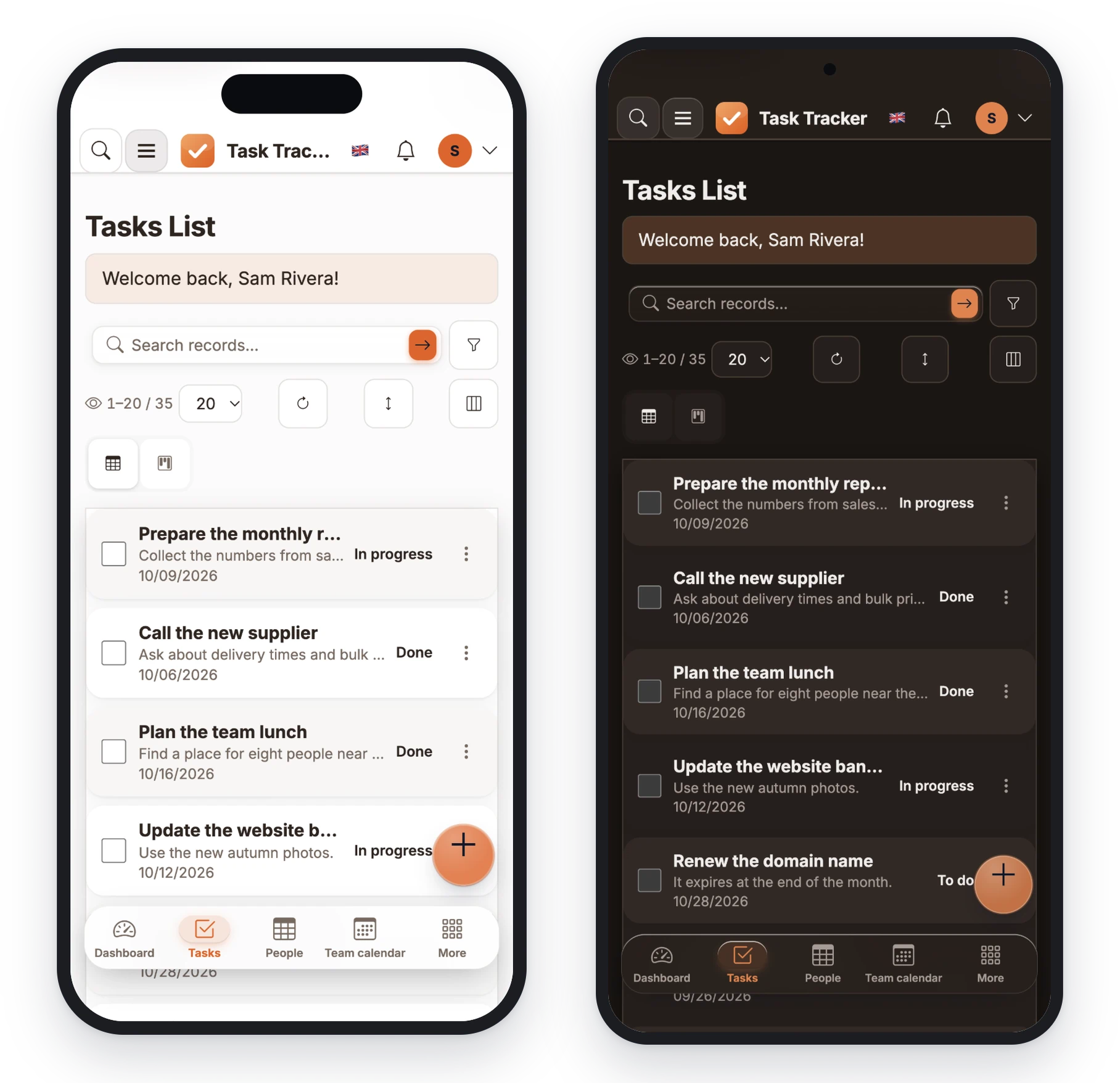
| Mobile, from the same build | A Mobile page with 94 settings: a bottom tab bar you shape, an app bar you arrange, eleven tap effects, five one-click flavour packs, and per-page exceptions — with a live phone preview that switches between an iPhone and a Pixel frame. |
| Installable app (PWA) | Your icon on the home screen, full screen with no browser bars, an offline read cache and a durable write queue, and web push with keys generated for you. No app store, no second codebase. |
| REST API & webhooks | Any table exposed with per-scope permissions, bearer or HMAC authentication, rate limits, CORS and live documentation — so the app you built is also a back end. |
| Databases | Design against MySQL, MariaDB, PostgreSQL, SQLite, SQL Server and more — or start on the built-in zero-server Virtual Database and move later. Generated apps carry a runtime dialect layer, so the same app installs onto a different engine. |
| Security as the default | Prepared statements, escaped output, CSRF tokens and security headers in the generated code; passkeys and two-factor sign-in; row-level security; field encryption; an audit trail; record locking. |
| Integrations | Stripe, PayPal, Razorpay, Khalti, eSewa and Fonepay; S3, Cloudflare R2, MinIO, Google Drive and OneDrive; SMTP with failover and 21 SMS gateways; PDF documents; e-mail-style in-app messaging; 16 theme presets and full translation. |
The whole path, in order
- Unzip PPServer and start it. One folder, one double-click. It prints its own address.
- Put the studio in
www. The installer asks which database to use and creates the rest. - Make a project and its tables — in the visual designer, by importing a CSV, or by pointing at a database you already have.
- Press Build. You now have a working application: sign-in, lists, forms, dashboards, search, exports.
- Design the phone experience on the Mobile page and build again. Same project, same output, no second codebase.
- Deploy over the built-in FTP/SFTP client, or copy the folder to any PHP host — shared hosting, cPanel, a VPS, a container. It is ordinary PHP; it runs where PHP runs.
Who this is for
Start where you are
If the environment is what has been stopping you, start with PPServer — it is free, it is one folder, and the uninstall is a drag to the bin. If you already have a stack you like, skip it and go straight to the complete guide to PPPHP RAD Studio, or see how one build becomes a phone app and what the API, real-time and security layers cover. Questions are welcome in the community.
Frequently asked questions
Is PPServer really free?
Yes. PPServer is free to download and use for local development on Windows, macOS and Linux. It bundles PHP, MariaDB, Caddy, SQLite, phpMyAdmin and a SQLite browser in one folder.
How is PPServer different from XAMPP, WAMP, MAMP or Laragon?
It is portable rather than installed: no installer, no administrator password, no Windows service and no system-wide PHP. It runs from any folder — including a USB stick — on all three operating systems with the same screens, and it handles a busy port 80 by stepping aside to 8080 and remembering that choice instead of asking you to edit a config file.
What if port 80 or 3306 is already in use?
PPServer detects it on first run and uses 8080 and 3307 instead, records the choice, and prints the address it took. Nothing to edit, and the address stays the same from then on.
Do I need administrator rights to run it?
No. That is deliberate, so it works on a locked-down work laptop, a lab machine or a school computer. On macOS and Linux a port below 1024 does need elevation, so PPServer uses 8080 there unless you enable the friendly URL once.
How do I uninstall it?
Delete the folder. Nothing was installed anywhere else. Keep a copy of the www and data folders first if you want your sites and databases.
Can I use PPServer without PPPHP RAD Studio?
Yes. It is a general-purpose PHP stack — run Laravel, WordPress, a framework of your choice or plain PHP files from the www folder.
Does PPPHP RAD Studio generate code I can read and own?
Yes. The build writes plain PHP, SQL, HTML, CSS and JavaScript into a folder. There is no runtime library to license, no per-seat fee on the application you built, and you can host it on any PHP hosting.
Can I build a mobile app without learning React Native or Flutter?
For data-centric apps, yes. The Mobile page gives the same build a bottom tab bar, phone-shaped controls, offline reading, a write queue and web push, and it installs to the home screen as a PWA. One project serves desktop and phone.
Will it work on shared hosting?
Yes. A generated app is ordinary PHP 8 and runs on shared hosting, cPanel, a VPS or a container. It does not require mod_rewrite, and an optional installer lets the destination pick its own database so no credentials are baked into the build.
Build your first app today
Point PPPHP RAD Studio at a database — or start on the built-in one — and have a secure, responsive web app running before lunch.